The item builder: any item on any hero
Open a hero, pick an item for each slot and watch it on the hero in 3D before anything reaches the game. Everything you can pick comes from your own game files, so nothing is downloaded and a new item appears when Valve adds it.
Checked
What it does
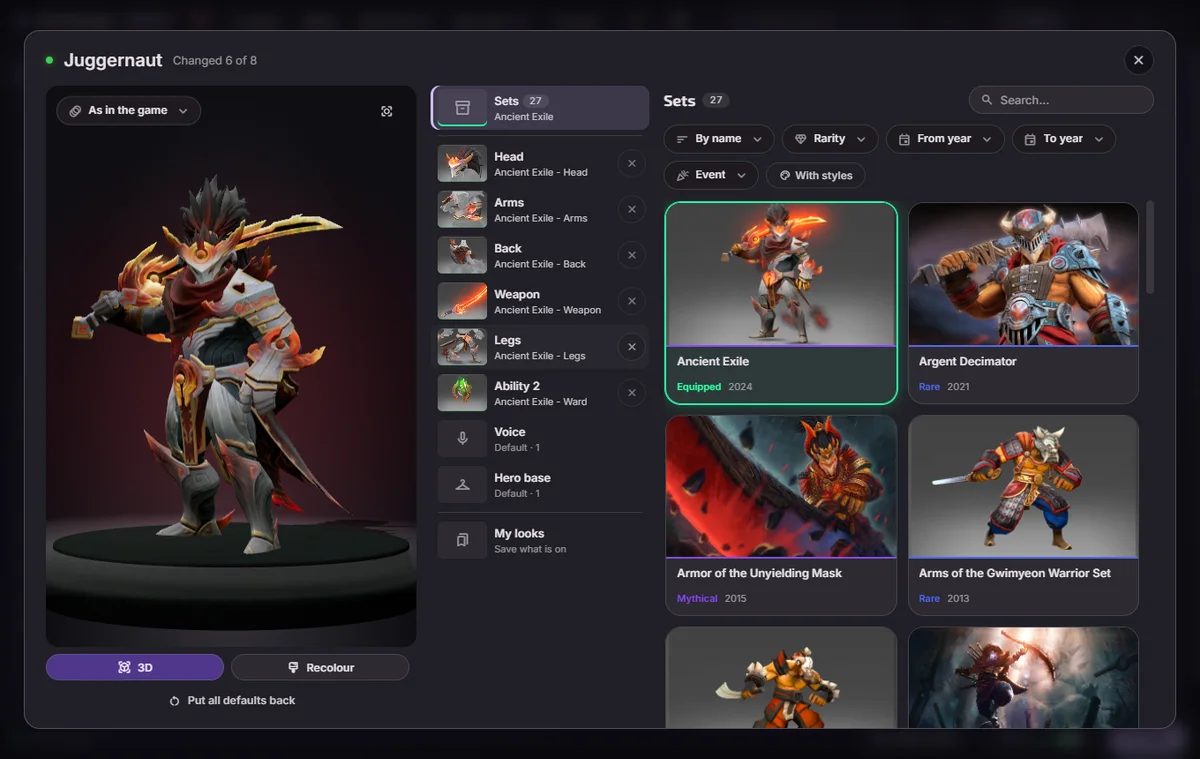
The Items tab lists every hero. Choose one and you get a changing room: one row for each slot the hero has, with every item the game holds for that slot, styles included. Only your screen shows the result. Your account gets no item and the other players see the hero as usual.
Building a look
- Open the heroGo to Items and click the hero.
- Pick the itemsClick a slot, search by name, and pick an item. A set fills every slot it covers at once.
- Check it in 3DTurn on the 3D preview and look from every side before you apply anything.
- ApplyThe app builds the look and installs it. Dota picks it up the next time it starts.
The 3D preview
- Items follow the hero's bones, the way they do in a match.
- Drag to tilt, use the right button to shift and the wheel to zoom. WASD with Q and E flies the camera, and a double click puts it back.
- The list above the stage plays any animation of the hero, and the motions follow what the hero wears.
- Wearables play their own animations, second models show, and parts an item hides disappear.
Files, and when the item table comes in
Hero items install as ordinary files. The app leaves gameinfo and the signature file alone and asks for nothing. Those files carry an item's effects, its material set, the hero's motions, the parts it hides and its second model.
A few picks need more than files: item size, kill effects and a few others. The window names them before you apply. They use the item table, which asks once and can be reverted byte for byte. What the app writes into the game.
- Do the other players see my items?
- No. The look is drawn on your screen alone. Your account owns nothing new.
- What happens after a Dota patch?
- The app checks its work after an update and rebuilds what the patch changed. When something still looks wrong.
- Can I take it all off?
- Yes. Your looks sit in My mods with every other mod: switch one off or delete it.