
How to remove Dota 2 mods
Three different things get called removing a mod: taking one off, turning everything off for one game, and leaving no trace at all. Here are all three, and what happens to the files in each.
Checked
Take one mod off
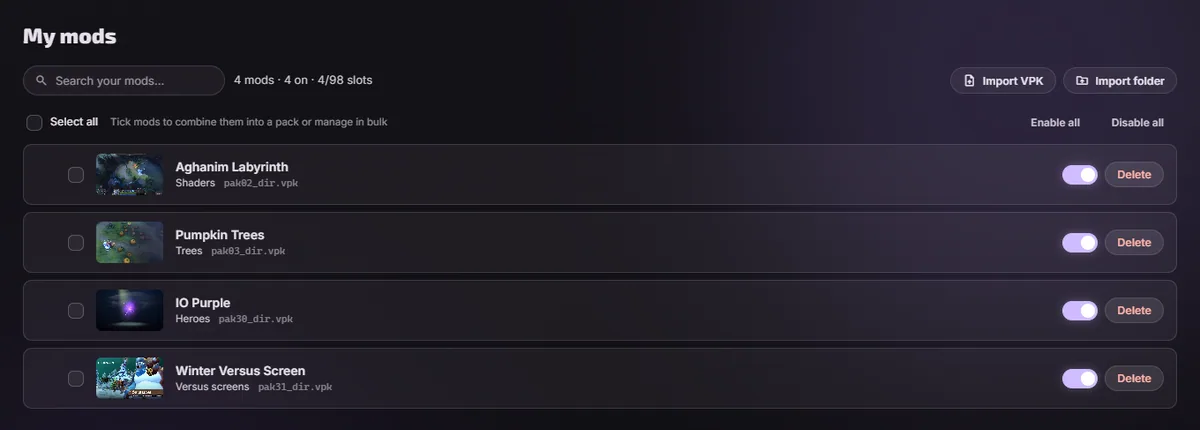
- Open My modsEverything installed, with a switch next to each one.
- Press DeleteThe file leaves the game folder and the entry leaves your library. The game goes back to how it was before that mod.
- Restart DotaThe game reads its archives when it starts, so a client already running will not notice.
Switching off is not deleting
If you want the mod back tomorrow, do not delete it. The switch next to a mod renames its file and leaves the entry in your library, and one click brings it back. A second switch turns every mod off at once, which is what you want before a tournament game or straight after a patch when you do not yet know what broke.
By hand, without the app
A mod is a file called pakNN_dir.vpk sitting in the language folder the game mounts. Delete the file and the mod is gone.
- Open the language folderInside
...\steamapps\common\dota 2 beta\game\, named after your voice language rather than your text one:dota_russian,dota_koreanaordota_schinese. Which folder is yours. - Look at the pak numbersMods are pak02_dir.vpk through pak99_dir.vpk. Every file in the folder that is not pak01 arrived from outside the game.
- Delete the ones you want goneGaps in the numbering are fine. The game does not care whether pak04 exists when pak05 does.
Never delete pak01_dir.vpk or the pak01_NNN.vpk files next to it. Those are the game's own, and deleting them means a repair through Steam.
Fonts and cursors
These two replace files instead of layering over them, so the app copies the originals before installing and puts them back when you remove the mod. If you installed a font by hand and kept no copy, Steam's file verification returns it.
Back to a clean game
- Switch safe mode back on, which takes the looks off the default items. The app restores
gameinfo_branchspecific.gianddota.signaturesfrom the copies it made before the first write. - Delete everything in My mods.
- If you ever installed anything by hand, look in the language folder for pakNN_dir.vpk files still sitting there.
- In Steam, open the game properties, then Installed Files, then verify integrity. That returns everything that belongs to Valve.
- The app itself uninstalls the ordinary way, through Installed apps in Windows.

Questions
- Does removing a mod remove cosmetics from my inventory?
- No. Nothing here touches your Steam account, and your inventory is untouched either way.
- Will verifying files in Steam remove my mods?
- It restores files that belong to the game. Extra pakNN_dir.vpk files in the language folder are usually left alone, so if the point is to get rid of mods, delete those yourself.
- I removed a mod and the game still shows it.
- Restart the game completely: archives are read at startup. If it survives that, a second mod is probably carrying the same files. How the game picks a winner.